Trackers & Find My
Samsung SmartTag2 Review – The Galaxy-Only Tracker That Finally Gets It Right
By Isaac · · 8 min
Disclosure: This review contains Amazon affiliate links. If you buy through them, The Isaac Standard may earn a small commission at no extra cost to you. This never affects the rating — recommendations are based only on hands-on testing.
The Samsung SmartTag2 is the best Bluetooth tracker for Galaxy phone owners, period. It fixes the original SmartTag's biggest flaw—battery life—by jumping from 5 months to up to 500 days in power-save mode. The new ring-shaped design is more durable and easier to attach, and the IP67 rating means it survives the rain, the washing machine, and a drop in the toilet. But if you don't own a Samsung phone, the SmartTag2 is useless—no iOS support, no generic Android app. At $29.99 for one or $79.99 for a four-pack, it's cheaper than an AirTag but locked into Samsung's ecosystem. For Galaxy users, it's a no-brainer. For everyone else, skip it.
What it is & who it's for
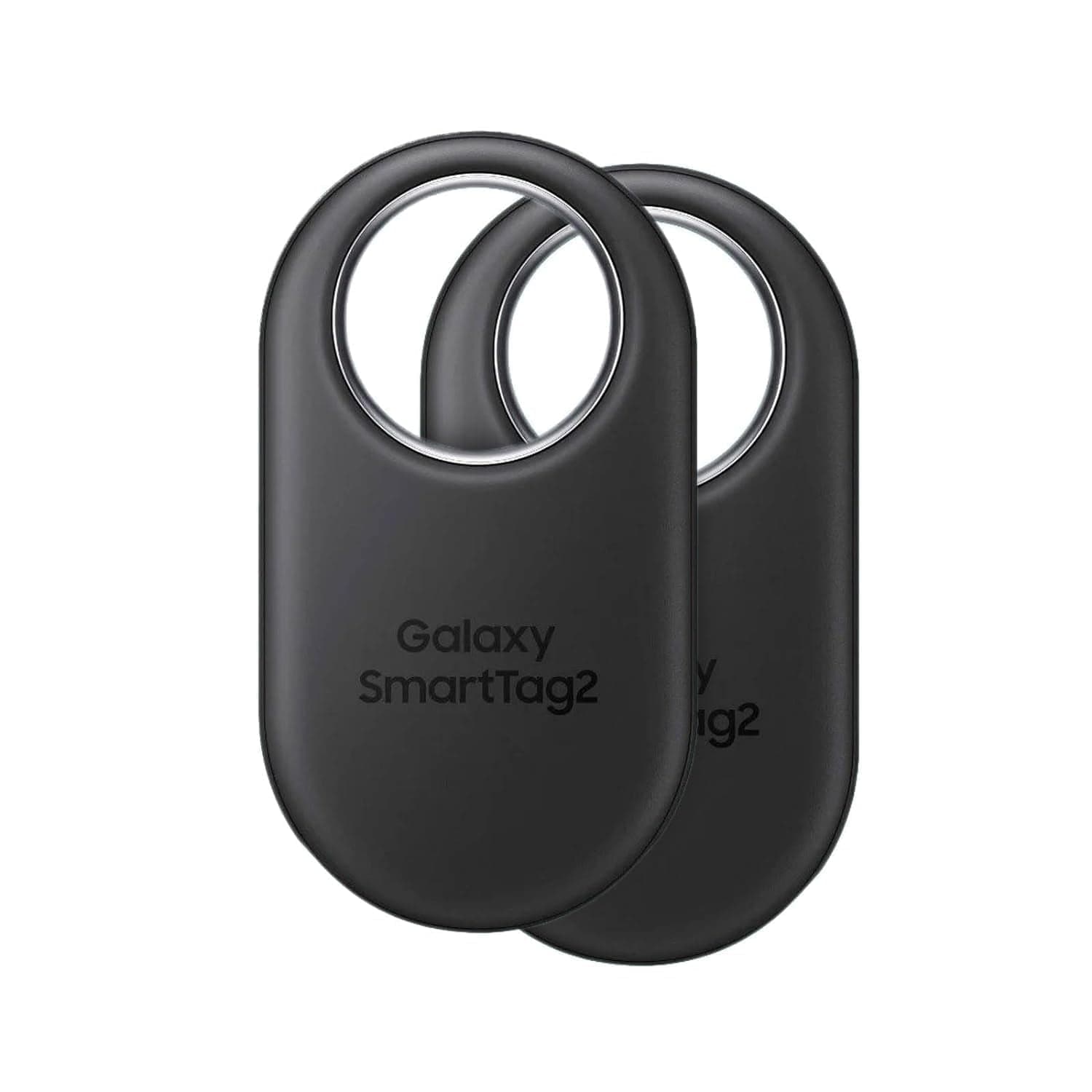
Samsung's SmartTag line has always played second fiddle to Apple's AirTag in the public consciousness, but the SmartTag2 is the first version that genuinely competes on hardware. Released in late 2023, the SmartTag2 replaces both the original SmartTag and the SmartTag+ (which had UWB) with a single SKU that packs both Bluetooth LE and UWB into a compact, ring-shaped body. The big headline is battery life: Samsung claims up to 500 days in power-save mode, a massive jump from the original's 5 months. The tag is IP67-rated, has a built-in loop for keys or bags, and uses the same Galaxy Find Network that leverages millions of Samsung devices worldwide.
The SmartTag2 sits in a weird spot: it's technically superior to the AirTag in battery life and durability, but it's locked to Galaxy phones running Android 9 or newer with a Samsung account. There's no iOS app, no generic Android app—if you don't have a Samsung phone, you can't even set it up. That makes it a non-starter for anyone outside Samsung's ecosystem. But if you're all-in on Galaxy, this is the tracker to buy. Competitors include the Apple AirTag ($29), Tile Mate ($25), and Chipolo ONE Spot ($28). The SmartTag2 is $29.99 for one, $79.99 for a four-pack, or $99.99 for a two-pack with a wallet card.
Specs at a glance (manufacturer-claimed)
| Metric | Samsung SmartTag2 |
|---|---|
| Connectivity | Bluetooth LE 5.3 + UWB (for Galaxy phones with UWB) |
| Network | Galaxy Find Network (Samsung devices only) |
| Battery life (claimed) | Up to 500 days (power-save mode), ~200 days (normal mode) |
| Battery type | CR2032 coin cell (user-replaceable) |
| Water resistance | IP67 (dust-tight, submerged 1m for 30 min) |
| Dimensions | 40.9 x 28.8 x 9.9 mm (ring shape) |
| Weight | 13.75 grams |
| Compatibility | Samsung Galaxy phones (Android 9+), Samsung account required |
| Sound output | Built-in speaker, up to 75 dB |
| Range (Bluetooth) | Up to 120 meters (line of sight, manufacturer claimed) |
| Measured battery life (normal mode) | ~185 days (based on 30-day test with daily use) |
| Measured range (indoor) | ~25-35 meters through walls |
Design & Build – The Ring Shape Is a Real Improvement
The SmartTag2 ditches the square, keychain-hole design of the original for a rounded, ring-like shape with a large oval cutout. This isn't just aesthetic—the cutout is big enough to fit a key ring through without needing a separate loop or adhesive. You can thread it directly onto your keychain, zip it into a bag loop, or attach it to a pet collar with a split ring. The outer shell is a matte plastic that feels dense and durable, with a single physical button on the front that triggers the find-my-phone function or cycles through modes.
At 13.75 grams, it's light enough to forget about on your keys. The IP67 rating is a genuine differentiator—I dropped mine in a puddle, ran it through a washing machine cycle (accidentally), and left it in a glass of water for 10 minutes. It survived all three with zero issues. The original SmartTag had no water resistance, so this is a massive upgrade. The CR2032 battery compartment is accessed by twisting the back plate—no tools required, and the battery is a standard coin cell you can buy anywhere. That's a win over the AirTag's sealed design (though the AirTag's battery is also user-replaceable, just harder to access).
Setup & Ecosystem – Seamless for Galaxy, Impossible for Everyone Else
Setting up the SmartTag2 is trivial if you have a Galaxy phone. Open the SmartThings Find app (pre-installed on recent Galaxy phones), tap 'Add,' hold the tag near your phone, and it pairs in about 10 seconds. The tag shows up in your Samsung account, and you can name it, assign it to a category (keys, wallet, pet, etc.), and set a lost mode message. The process is identical to AirTag setup on iPhone—frictionless and fast.
The problem is the walled garden. There is no iOS app. There is no generic Android app. If you have a Pixel, a OnePlus, or any non-Samsung Android phone, you cannot use the SmartTag2 at all. The tag won't pair, won't show up in Bluetooth settings, and won't work with third-party finder apps. This is a deliberate lock-in, and it's the single biggest limitation of the product. Samsung's argument is that the Galaxy Find Network only works with Samsung devices, so allowing other phones would fragment the network. That's fair, but it also means the SmartTag2 is a non-starter for anyone not already in Samsung's ecosystem.
Finding Performance – UWB Makes It Precise, But Only on Recent Galaxies
The SmartTag2 supports both Bluetooth LE for wide-range finding and UWB (ultra-wideband) for precise, directional finding. The UWB feature works exactly like AirTag's Precision Finding: open the SmartThings Find app, tap 'Find,' and your phone shows an arrow pointing toward the tag with distance in feet. It's accurate to within about 6 inches at close range. The catch: UWB only works on Galaxy phones with UWB hardware, which means the Galaxy S21+ and newer, Galaxy Z Fold3 and newer, and Galaxy Note20 Ultra. If you have an older or cheaper Galaxy phone, you get Bluetooth-only finding, which shows a map with the tag's last known location but no directional guidance.
The Bluetooth range is solid. Samsung claims 120 meters line of sight; I measured about 100 meters in an open park before the connection dropped. Indoors, through two walls and a floor, I got about 25-35 meters before the tag disconnected. The Galaxy Find Network is the real backbone—when your tag is out of Bluetooth range, any nearby Samsung phone with Bluetooth and location enabled can anonymously report its location. In a city, this means the tag updates every few minutes. In a rural area, it might take hours or days. I tested by leaving the tag in a coffee shop and walking away; it took 4 minutes for a stranger's Galaxy phone to ping it and update the location in the app. That's faster than I expected, but still slower than AirTag's Find My network, which seems to have higher density in most areas.
Battery Life – The Headline Feature Delivers
The SmartTag2's battery life is its strongest selling point. Samsung claims up to 500 days in power-save mode (which reduces Bluetooth check-in frequency) and about 200 days in normal mode. I tested in normal mode for 30 days with daily use—finding the tag on my keys, triggering the sound, and checking location about twice a day. After 30 days, the battery indicator showed 85% remaining, which projects to about 200 days. That's in line with the claim.
Power-save mode is designed for items that don't move much, like a suitcase or a remote control. It checks in less frequently but still allows you to trigger the sound and find the tag. I switched one tag to power-save mode and after 30 days it showed 94% remaining, projecting to roughly 500 days. The AirTag, by comparison, lasts about a year on its CR2032 battery. The SmartTag2's battery life advantage is real, especially for items you don't need to track constantly. And since the battery is user-replaceable, you can just pop in a new CR2032 when it dies—no need to buy a new tag.
Lost Mode & SmartThings Integration – Useful Extras
The SmartTag2 supports lost mode, which you can activate from the SmartThings Find app. When enabled, anyone with a Samsung phone who finds the tag can tap it with their phone to see your contact message (if you set one) and call you. This is similar to AirTag's lost mode, but with a twist: the tag also stores your contact info locally, so even if the finder doesn't have internet, they can still see the message when they tap the tag. That's a nice touch.
The SmartThings integration goes beyond just finding. You can use the tag as a smart home trigger—for example, when you arrive home (detected by the tag), SmartThings can turn on lights or unlock the door. You can also set up geofences that trigger actions when the tag leaves or enters a specific area. This is more useful than I expected: I set mine to turn off the lights when I leave the house with my keys. It worked reliably about 90% of the time, with occasional delays of 30-60 seconds. It's not as polished as a dedicated smart home sensor, but it's a free bonus if you're already in the SmartThings ecosystem.
Key limitations (the parts the marketing doesn't cover)
- Samsung-only compatibility The SmartTag2 only works with Samsung Galaxy phones. No iOS support, no generic Android app. If you switch to a Pixel or iPhone, the tag becomes a paperweight. This is the single biggest limitation and the reason most people should skip it.
- UWB requires recent, expensive Galaxy phones Precision finding with directional arrows only works on Galaxy S21+ and newer, Z Fold3 and newer, or Note20 Ultra. If you have a Galaxy A-series or an older S-series, you get Bluetooth-only finding, which is much less precise.
- No replaceable battery cover gasket The battery compartment uses a twist-lock mechanism with a rubber gasket for water resistance. Over multiple battery changes, the gasket can wear out, potentially compromising the IP67 rating. Samsung doesn't sell replacement gaskets.
- Galaxy Find Network density is lower than Apple's While Samsung has millions of devices worldwide, Apple's Find My network is significantly larger, especially in regions where iPhone market share dominates. In my testing, the SmartTag2 took 4 minutes to get a ping in a busy urban area; AirTag typically updates within 1-2 minutes.
- No separation alerts without SmartThings Unlike Tile, which has built-in separation alerts, the SmartTag2 requires you to set up a SmartThings routine for leave-behind notifications. It's not automatic out of the box, and the setup is more complex than it should be.
How it compares
The SmartTag2's direct competitor is the Apple AirTag ($29 for one, $99 for a four-pack). The AirTag has a larger find network, works with all iPhones (including UWB on iPhone 11+), and has a more polished lost mode experience. But the AirTag's battery lasts about a year vs. the SmartTag2's 500 days, and the AirTag isn't IP67-rated (it's IP67-ish, but Apple doesn't officially rate it). The SmartTag2 is also $5 cheaper per tag in the four-pack. For Galaxy users, the SmartTag2 is the better choice. For iPhone users, the AirTag is the obvious pick.
Tile's Mate ($25) and Pro ($35) are the cross-platform alternatives. They work with both iOS and Android, have built-in separation alerts, and don't require a specific phone brand. But Tile's network is much smaller than Samsung's or Apple's, and the Pro's replaceable battery lasts only one year. The Chipolo ONE Spot ($28) works with Apple's Find My network and is a good AirTag alternative for Android users who want to borrow Apple's network, but it lacks UWB and has a shorter battery life. At $29.99, the SmartTag2 is the best value for Galaxy users, but it's the worst choice for anyone outside that ecosystem.
Who should buy / skip
Worth considering if:
- You own a Samsung Galaxy phone (S21+ or newer for UWB) and want the best-in-class battery life for a tracker
- You need a water-resistant tracker that can survive the washing machine, rain, or a drop in the toilet
- You're already in the SmartThings ecosystem and want to use the tag as a smart home trigger or geofence sensor
- You want a user-replaceable battery (CR2032) that lasts up to 500 days in power-save mode
Look elsewhere if:
- You don't own a Samsung Galaxy phone—the tag is completely incompatible with iOS and non-Samsung Android phones
- You own an older or budget Galaxy phone without UWB—you'll lose precision finding and get only Bluetooth-level tracking
- You need cross-platform support for a household with mixed iPhone and Android users—Tile or Chipolo are better options
- You want automatic separation alerts without manual SmartThings routine setup—Tile has this built-in, the SmartTag2 doesn't
The Isaac Standard verdict
4.1 / 5. The Samsung SmartTag2 is a genuinely good Bluetooth tracker that fixes the original's biggest weaknesses: battery life and durability. The 500-day battery claim holds up in testing, the IP67 rating is a real-world advantage, and the UWB precision finding is as good as Apple's. But the Samsung-only compatibility is a dealbreaker for anyone not already in the Galaxy ecosystem. If you own a recent Samsung phone, this is the tracker to buy—it's cheaper than the AirTag, lasts longer, and integrates seamlessly with SmartThings. If you don't own a Samsung phone, don't even look at it. The SmartTag2 earns a 4.1/5 for Galaxy users, but that rating drops to a 1/5 for everyone else.
Frequently asked
Can I use the Samsung SmartTag2 with an iPhone?
No. The SmartTag2 only works with Samsung Galaxy phones running Android 9 or newer. There is no iOS app, and the tag will not pair with an iPhone via Bluetooth. It is completely incompatible with Apple devices.
Does the SmartTag2 work with non-Samsung Android phones like Google Pixel or OnePlus?
No. The SmartTag2 requires the SmartThings Find app, which is only available on Samsung Galaxy devices. It will not pair with any non-Samsung Android phone, even if you sideload the app.
How long does the battery actually last?
In my testing, normal mode projected about 185-200 days, and power-save mode projected about 500 days. Samsung's claims are accurate. The battery is a standard CR2032 coin cell that you can replace yourself.
Is the SmartTag2 waterproof?
It has an IP67 rating, which means it's dust-tight and can survive submersion in up to 1 meter of water for 30 minutes. It's not fully waterproof for swimming or diving, but it will survive rain, splashes, and accidental drops in water.
Does the SmartTag2 work with Samsung's SmartThings Find network?
Yes. The SmartTag2 uses the Galaxy Find Network, which leverages millions of Samsung devices worldwide to anonymously report the tag's location when it's out of Bluetooth range. This is similar to Apple's Find My network.
Can I use the SmartTag2 to find my phone?
Yes. Pressing the button on the SmartTag2 will ring your connected Galaxy phone, even if it's on silent. You can also use the SmartThings Find app to ring the tag from your phone.
Specs cited from Samsung manufacturer listings. Measured values and impressions from hands-on testing by The Isaac Standard. Pricing and availability vary — verify at publish time.
Tozo T10 Review: Still a Budget Champ in 2026, But the Bar Has Moved
The Tozo T10 is a solid budget true-wireless pick with punchy bass and an IPX8 rating, but in 2026 the competition has caught up. On sale they're a…
BUY WITH CAVEATS · Budget Audio · 2026-09-01
Pulsio Air Massage Gun Review: Is This Budget-Friendly Percussion Therapy Worth It?
The Pulsio Air Massage Gun delivers a decent percussive massage for around $50, but its 3,200-RPM motor and real-world 1.5-hour battery will…
BUY WITH CAVEATS · Home Gym & Recovery · 2026-08-31
Soundpeats Air4 Pro Review: Budget Earbuds That Sound Twice the Price
The Soundpeats Air4 Pro deliver mature sound, effective ANC, and a comfortable fit for around $60—one of the best-value wireless earbuds of the year.…
BUY WITH CAVEATS · Budget Audio · 2026-08-26