Desk Gear
Logitech MX Mechanical Review: The Productivity Keyboard That Almost Does It All
By Isaac · · 7 min
Disclosure: This review contains Amazon affiliate links. If you buy through them, The Isaac Standard may earn a small commission at no extra cost to you. This never affects the rating — recommendations are based only on hands-on testing.
The Logitech MX Mechanical is a well-built, quiet mechanical keyboard designed for productivity users who want tactile feedback without the noise. It excels in multi-device workflows and battery life, but its high price, lack of backlighting on the Mac version, and limited switch options hold it back from greatness.
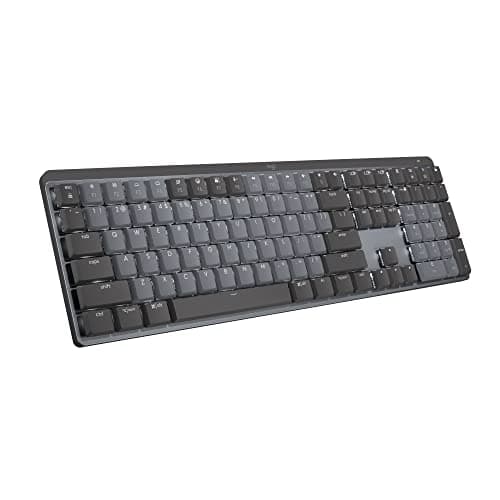
What it is & who it's for
The Logitech MX Mechanical is Logitech's first mechanical keyboard aimed squarely at the productivity crowd, not gamers. It brings the company's signature multi-device pairing, Flow software, and excellent build quality to a mechanical form factor with low-profile switches.
This keyboard is for anyone who types all day and wants the satisfying feel of mechanical switches without the loud clatter of traditional gaming keyboards. It's also a strong contender for Mac users who need a mechanical option with macOS-specific keycaps.
Specs at a glance (manufacturer-claimed)
| Metric | Logitech MX Mechanical |
|---|---|
| Switch Type | Low-profile mechanical (Tactile Quiet, Linear, Clicky) |
| Connectivity | Bluetooth Low Energy, Logi Bolt USB receiver, USB-C wired |
| Battery Life | Up to 15 days with backlighting, up to 10 months without (manufacturer claimed) |
| Layout | Full-size with numpad (also available in Mini and Tenkeyless variants) |
| Multi-device | Up to 3 paired devices via Easy-Switch buttons |
Build and Design: Premium, but Not Perfect
The MX Mechanical feels solid. The plastic chassis has a nice matte finish, and the keyboard has a slight angle that's comfortable for long typing sessions. The low-profile switches sit closer to the deck than standard mechanicals, which reduces wrist strain for some users.
However, the lack of a USB-C port on the keyboard itself for charging (it uses a detachable USB-C cable) is fine, but the port placement on the left side is awkward if you use a wired connection. Also, the keyboard is not hot-swappable, so you're stuck with the switch choice you buy.
Typing Experience: Quiet and Smooth, but Limited Options
The Tactile Quiet switches are the highlight. They provide a noticeable bump without the click, making them ideal for open offices. The keys are stable and the low-profile design makes for fast, accurate typing. The included keycaps are doubleshot ABS, which feel good but may develop shine over time.
If you want a linear or clicky feel, those options exist, but they're not as refined as the tactile quiet. The clicky version is louder than most productivity keyboards but still quieter than a standard Cherry MX Blue. The lack of a standard mechanical switch choice (like Cherry or Gateron) may disappoint enthusiasts.
Software and Connectivity: Logitech's Best, With Caveats
Logitech Options+ is the companion software, and it's excellent. You can remap almost any key, set app-specific profiles, and use Flow to seamlessly control multiple computers. The Easy-Switch buttons let you toggle between three paired devices instantly.
The keyboard supports Bluetooth and Logi Bolt, but not the older Unifying receiver. If you have a Unifying mouse, you'll need a separate receiver. The battery life is impressive, but the backlighting is only white (no RGB) and the Mac version lacks backlighting entirely, which is a strange omission.
Key limitations (the parts the marketing doesn't cover)
- No Backlight on Mac Version The Mac-specific variant (MX Mechanical for Mac) has no backlighting at all. If you work in dim conditions, you'll need the Windows version, which has white backlighting. This feels like an unnecessary compromise.
- Non-Standard Keycaps and Switches The low-profile switches are proprietary, meaning you can't swap them for standard MX-style switches. The keycaps are also non-standard, so customization is limited. If you like to tinker, this isn't the keyboard for you.
- High Price for What You Get At $149.99, the MX Mechanical is expensive. You're paying for the multi-device convenience and build quality, but the typing experience doesn't match that of a $100 mechanical keyboard with standard switches. The lack of hot-swap and RGB may also feel like a downgrade for some.
How it compares
Compared to the Keychron K3 (a low-profile mechanical keyboard), the MX Mechanical has better software and multi-device support, but the K3 is cheaper, has hot-swappable switches, and offers RGB backlighting. The Logitech feels more premium but is less flexible.
Against the Apple Magic Keyboard, the MX Mechanical is a huge upgrade in typing feel and customization, but it's heavier, louder, and requires batteries. The Magic Keyboard is better for portability and silence.
Versus the Razer Pro Type Ultra, the Logitech has better battery life and multi-device support, but the Razer has a more traditional mechanical feel and a lower price. The Razer also includes a wrist rest, which the Logitech lacks.
Who should buy / skip
Worth considering if:
- You type all day and want a quiet mechanical keyboard with a premium feel.
- You use multiple computers (Mac and PC) and want seamless switching with Flow.
- You prefer low-profile switches for ergonomic reasons.
Look elsewhere if:
- You want a fully customizable mechanical keyboard with hot-swappable switches.
- You need RGB backlighting or any backlighting on a Mac.
- You're on a tight budget and don't need multi-device features.
The Isaac Standard verdict
4.0 / 5. The Logitech MX Mechanical is a well-executed productivity keyboard that nails the basics: build quality, multi-device connectivity, and a quiet typing experience. But its high price, limited switch options, and the baffling lack of backlighting on the Mac version make it a niche recommendation. If you live in the Logitech ecosystem and value seamless device switching, it's a great choice. Otherwise, you can get more flexibility for less money elsewhere.
Frequently asked
Is the Logitech MX Mechanical good for gaming?
It's not designed for gaming. The low-profile switches are fine for casual gaming, but the lack of high polling rate, no dedicated gaming software, and the absence of RGB make it a poor choice for competitive gamers.
Can I use the MX Mechanical with a Mac?
Yes, but the Mac version has no backlighting. The Windows version works with Mac via Bluetooth, but the keycaps are Windows-specific (Alt/Win keys). You can remap them in software.
Does the keyboard come with a wrist rest?
No, it does not. Logitech sells a separate MX Palm Rest, but it's an additional cost. The keyboard's low profile may reduce the need for one, but many users will want it.
How does the battery life hold up in real use?
With backlighting on, expect about 10-12 days of heavy use. Without backlighting, it can last months. The USB-C charging is fast, and you can use it while charging.