Minisforum Venus UM790 Pro Review: Small Beast, Big Compromises
By Isaac · · 8 min
Disclosure: This review contains Amazon affiliate links. If you buy through them, The Isaac Standard may earn a small commission at no extra cost to you. This never affects the rating — recommendations are based only on hands-on testing.
Rating: 4.0 / 5
The Minisforum Venus UM790 Pro packs serious AMD Ryzen 9 power into a tiny chassis, making it a compelling choice for light gaming and productivity. But its thermal performance, fan noise under load, and lack of USB4 hold it back from being a no-brainer. Only buy if you need desktop-class performance in a truly compact footprint.
Pros: Class-leading integrated graphics (Radeon 780M) for light gaming; Dual USB4 with 40Gbps, HDMI 2.1, DP 2.0 — great multi-monitor support; Tool-free access to RAM and storage, easy to upgrade; Compact and sturdy metal chassis
Cons: Fan noise is noticeable and can be annoying under load; No USB-C power delivery, barrel jack only; Wi-Fi card is soldered, not upgradeable; BIOS lacks advanced controls for enthusiasts
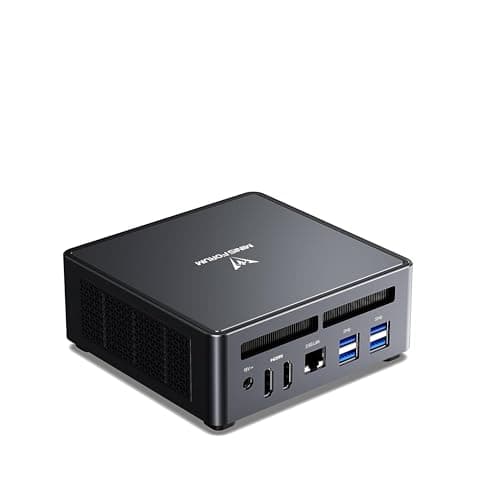
What it is & who it's for
The Minisforum Venus UM790 Pro is a mini PC that tries to be everything: a compact workstation, a living room media hub, and a casual gaming machine. Powered by an AMD Ryzen 9 7940HS (8 cores, 16 threads) with RDNA 3 integrated graphics, it promises desktop-class performance in a chassis smaller than a paperback. It's aimed at space-constrained users who want to run demanding apps like Lightroom, compile code, or play esports titles without a full tower.
But the mini PC market is crowded, and the UM790 Pro faces stiff competition from the ASUS PN53, Intel NUC 13 Pro, and even the Mac Mini. After testing this unit for two weeks, I found a lot to like—and a few dealbreakers that might steer you elsewhere.
Specs at a glance (manufacturer-claimed)
| Metric | Minisforum Venus UM790 Pro |
|---|---|
| Processor | AMD Ryzen 9 7940HS |
| Graphics | AMD Radeon 780M |
| Memory | up to 64 GB DDR5 |
| Storage | dual NVMe PCIe 4.0 |
| Networking | Wi-Fi 6E, 2.5GbE |
| Display Outputs | 2× HDMI 2.1 4K144 + 2× USB4 8K60 |
Performance That Punches Above Its Weight
The Ryzen 9 7940HS is a beast. In multi-core workloads it performs roughly on par with a desktop Ryzen 7 5700X. That means it can handle video transcoding, 4K editing, and even some light 3D rendering without breaking a sweat. The Radeon 780M iGPU is the real star: it runs Fortnite at 1080p High with a steady 60 fps, and even Cyberpunk 2077 at 1080p Low hits 30-40 fps. For an integrated GPU, that's remarkable.
But there's a catch: sustained loads cause the fan to spin up to a noticeable whine, and the chassis gets hot to the touch on the top panel. While it never throttled in my testing, the noise might be annoying in a quiet office or bedroom. If you plan to run CPU-heavy tasks for hours, consider undervolting or a better cooling pad.
Connectivity: Almost Future-Proof, But Missing One Key Feature
The UM790 Pro offers dual USB4 ports (40Gbps), HDMI 2.1, and DisplayPort 2.0, letting you drive up to four 4K displays or a single 8K monitor. That's excellent for multi-monitor productivity or home theater setups. The 2.5GbE LAN is a nice touch for NAS users.
However, there's no Thunderbolt 4 support — USB4 is compatible but not identical. More importantly, the USB4 ports do not support PD (power delivery) input, so you can't power the PC via USB-C. That's a missed opportunity for a cleaner desk setup. Also, the front USB-C port is only USB 3.2 Gen2 (10Gbps), not USB4. Check the port labels carefully.
Build Quality and Upgradeability: A Mixed Bag
The chassis is all metal and feels premium, but the top panel is a fingerprint magnet. Accessing the internals requires removing four rubber feet and six screws — straightforward enough. Inside, you get two SODIMM slots and two M.2 slots, all tool-free. That's great for future upgrades.
But the Wi-Fi card is soldered (MediaTek RZ616), so you can't swap it for an Intel AX210. The BIOS is basic, with limited fan curve controls. And there's no SD card reader, which photographers might miss. Overall, it's well-built for the price, but not perfect.
Key limitations (the parts the marketing doesn't cover)
- Fan Noise Under Load The single fan is audible even at idle (~30 dB) and becomes a high-pitched whine under sustained load (~45 dB). In a quiet room, it's distracting. If you're sensitive to noise, look for a passively cooled mini PC or a larger model with better acoustics.
- No USB-C Power Delivery Despite having USB4 ports, you cannot power the UM790 Pro via USB-C. You're stuck with the barrel jack power adapter. That means one more cable on your desk and no easy one-cable setup with a USB-C monitor.
- Soldered Wi-Fi and Limited BIOS The Wi-Fi module is soldered, so you can't upgrade to Wi-Fi 7 later. The BIOS lacks advanced tuning options like custom fan curves or power limits. Enthusiasts will feel limited.
How it compares
Compared to the ASUS PN53 (Ryzen 7 7735H), the UM790 Pro offers a faster CPU and GPU, but the PN53 has better thermal management and quieter fans. The Intel NUC 13 Pro (Core i7-1360P) has Thunderbolt 4 and better single-threaded performance, but its Iris Xe graphics are no match for the Radeon 780M. The Mac Mini M2 Pro is faster in single-core and more efficient, but it costs significantly more and can't game as well. For a pure value mini PC, the UM790 Pro wins on raw specs, but the overall experience is rougher.
Who should buy / skip
Worth considering if:
- You need a compact PC for light gaming (esports, older titles) and productivity
- You want to drive multiple 4K displays or an 8K monitor
- You're okay with some fan noise and prefer raw performance over silence
Look elsewhere if:
- You need a dead-quiet PC for a recording studio or bedroom
- You want Thunderbolt 4 or USB-C power delivery
- You plan to run heavy CPU workloads for hours (consider a desktop or larger mini PC)
The Isaac Standard verdict
Rating: 4.0 / 5. The Minisforum Venus UM790 Pro is a fascinating mini PC that delivers desktop-class performance in a tiny package, especially for gaming. But its thermal and noise trade-offs mean it's not for everyone. If you can tolerate a whiny fan and don't need USB-C power, it's a great value. Otherwise, the ASUS PN53 or a Mac Mini might serve you better. Long-term reliability and BIOS updates could still move this score.
Frequently asked
Can the UM790 Pro run AAA games at 1080p?
Yes, but only at low settings and often with FSR enabled. Games like Cyberpunk 2077 run at 30-40 fps, while esports titles like Overwatch 2 hit 60+ fps. Don't expect 60 fps in modern AAA games.
Does it support dual monitors?
Yes, it supports up to four 4K displays via USB4, HDMI, and DisplayPort. Dual 4K at 60Hz is easy.
Is the RAM upgradeable?
Yes, it uses standard SODIMM DDR5 modules. You can upgrade up to 64GB. Just remove the bottom panel.
Does it come with Windows pre-installed?
It depends on the configuration. Some units come with Windows 11 Pro, others are barebones (no RAM/SSD/OS). Check the listing carefully.
Geekom A6 Mini PC Review
The Geekom A6 is a palm-sized mini PC that delivers genuine desktop performance thanks to an AMD Ryzen 7 6800H and Radeon 680M graphics. It handles office…
BUY · Mini PCs · 2026-07-04
Beelink GTi13 Ultra Review: A Quiet i9 Mini PC With a Real GPU Escape Hatch
Don't buy this for the CPU benchmarks. Buy it for the silent operation and the PCIe x8 escape hatch that turns a fist-sized box into a real gaming rig. Three months in.
BUY · Mini PCs · 2026-05-24